CRM & Scheduling Software for Painting Contractors

CRM Software starting at $59/month· 14-Day Free Trial
No credit card required · Cancel anytime
Works in the US, Canada, Australia, New Zealand & the UK
▶ Try the Live DemoStart Free Trial
📶Works even when you're offline

No signal? No problem. The crew app keeps working: jobs, notes, photos and estimates save on the phone and sync the moment you're back online.

🔄QuickBooks syncs automatically every 5 minutes

Connect QuickBooks Online with one click. Your customers, invoices and payments sync to QuickBooks every 5 minutes, so there's no double entry.

Integrates withZapierMakePayrollGustoQuickBooksADPPaychexConnect to thousands of apps, and run payroll: hours, overtime, tips & bonuses
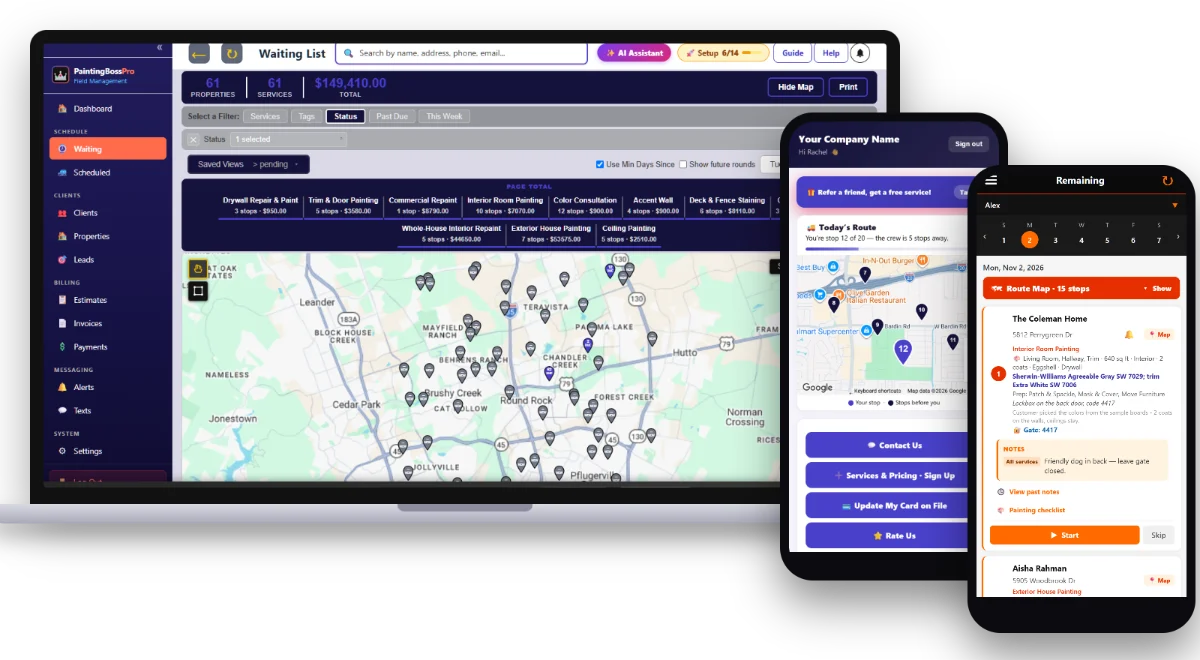
PaintingBossPro software on a laptop with the AI Assistant button and a hand-drawn map lasso, plus the client app and crew app on phones
Add-ons

All optional — use the ones you want, skip the ones you don't. Everything else in PaintingBossPro works the same either way, and you can turn any of them on or off anytime.

AI AnsweringNew Add-On

An AI receptionist for only 49¢ a minute

Answering 100+ calls a day? Email Support@bossprohq.com for our 29¢ volume rate.

The most real, human-sounding AI on the market — and it's built into PaintingBossPro, so it doesn't just take messages. It knows your customers and your CRM, tells them when you're coming, skips and reschedules services, tells existing customers your pricing and adds new services, sends a secure form to update their card, and takes down new customers for you. 24/7. You only pay when it answers.

📞 Answers every call, 24/7🧠 Knows your customers & CRM📅 Skips & reschedules💲 Quotes & adds services💳 Sends card-update form📝 Takes new leads✅ No monthly fee
AI AssistantIncluded on every plan

An AI office assistant that does the work

Included on every plan — see the plans below for how many questions each one comes with.

Just tell it what to do — like you'd tell your office manager. It's built into PaintingBossPro, so it knows your customers, your schedule and your money. It schedules and moves visits, adds plans at your price-table prices, texts customers, sends invoices and card forms, runs reports like your sales tax, and opens any page you ask for. It shows you every change first, and nothing happens until you press Confirm.

📅 Schedules & moves visits➕ Adds plans & customers💬 Texts customers📄 Sends invoices📊 Reports in seconds🧭 Opens any page👀 See it work →
Free WebsiteIncluded

A professional website, free with any paid plan

Websites like this often cost $5,000–$15,000 to have built. Yours is free.

We build it for you — a perfectly built 200–300 page website with a free domain, or use your own. Built to score 90+ on Google, and 100 on SEO, and we send you the score report once it's built. Fast on every phone, and every form on it goes straight into PaintingBossPro as a new lead.

🌐 Free domain (or use yours)📄 200–300 pages📈 90+ and 100 on SEO📝 Forms flow into your CRM📱 Mobile-perfect🛠 We build it for you

Compare our score to any other website you've been quoted — or the one you have now.

Pick the size you actually are

Every plan is the same software. The bigger plans lift the limits and turn on the automation — you are never paying for seats you do not have.

Start
$59
per month
Owner-operator, one van
MOST POPULAR
Pro
$89
per month
Small fleet, fully equipped
Crew
$199
per month
Multiple vans and routes
Users
Office logins - the people who dispatch, invoice and see the money
23Unlimited∞
Employees
Tech-app seats - they run the route and complete the jobs, they never see the money. Unlimited on every plan.
Unlimited∞Unlimited∞Unlimited∞
Vans
12Unlimited∞
Customers & addresses
Unlimited∞Unlimited∞Unlimited∞
Texts included (sent + received, US & Canada)
500 extra texts for $15 on any plan. Sent and received both count. A text is 160 characters; a longer one counts as two.
500 / month5001,000 / month1,0002,000 / month2,000
Smart Lasso map selections
Unlimited∞Unlimited∞Unlimited∞
Auto-routing
250 extra auto-routes for $5 on any plan, added automatically when you need them.
50 / month50100 / month1001,000 / month1,000
Service waiting list, live map & dispatch
✓✓✓
Recurring flushes & service that come due
✓✓✓
Estimates, templates & follow-ups
✓✓✓
Invoicing
✓✓✓
Card on file & customer payments
✓✓✓
Customer app
Your customer signs in by text — sees where they are on today’s route on a live map, sees invoices, pays, and sets their own alert preferences
✓✓✓
Tech app
Jobs in route order with one-tap navigation, the water heater and other equipment at each address with size, age and shut-off location, gate and access notes, inspection checklist, start, skip and complete jobs, before/after photos
✓✓✓
Schedule alerts
✓✓✓
Estimate alerts
✓✓✓
Receive customer replies
✓✓✓
Property manager & restaurant monthly billing
✓✓✓
AI Assistant
Ask anything about your business or tell it what to do: schedule visits, add plans and customers, text customers, send invoices. Nothing changes until you press Confirm. Need more? 250 more questions for $15.
50 questions/mo50100 questions/mo100250 questions/mo250
AI answering service
Add-on: a human-sounding AI receptionist that knows your customers & CRM. 49¢ a minute, no monthly fee.
49¢/min49¢/min49¢/min
Free website + domain
Or use your own domain. Built for Google SEO, with forms that go straight into PaintingBossPro.
✓✓✓
Card processing rate
Already getting a better rate from another processor? We’ll meet or beat it.
2.85% + 20¢2.85% + 20¢2.85% + 20¢
Zapier & Make integrations
Send new leads, jobs, invoices and payments to thousands of apps like Google Sheets, Mailchimp and Slack, or bring leads in. Instant webhooks and an API key.
✓✓✓
QuickBooks export
Customers, invoices and payments as QuickBooks-ready files
✓✓✓
Import from Jobber, Real Green & Service Autopilot
Bring your customers, properties and history over in minutes
✓✓✓
Facebook & Instagram
Messages, comments and lead forms in one inbox, plus posting. Launching soon
SoonSoonSoon
Google Business reviews & posts
Read and reply to Google reviews and post updates from the software. Launching soon
SoonSoonSoon
TikTok posting
Post videos and photos to TikTok right from the software, along with Facebook, Instagram and Google. Launching soon
SoonSoonSoon
Tech reviews & tips
Customers rate the tech after each job and can tip. Tips tracked per employee, minus processing.
✓✓✓
Crew splits & bonus goals
Tip and gross splits per truck, a bigger share for drivers, and bonuses techs track in the crew app.
✓✓✓
Payroll: Gusto, QuickBooks, ADP, Paychex
Hours, overtime, tips and bonuses ready for Gusto, QuickBooks, ADP or Paychex, manually or on a schedule.
✓✓✓
Meet your tech
Customers see who is coming: photo, rating, reviews and an about-me.
✓✓✓
Fast Setup
Trucks, crew, products, services, pricing and packages in about 10 minutes. Upload what you have.
✓✓✓
Crew app
Route the day, start and complete jobs, before/after photos, plus write and email estimates, send invoices and collect payment on the spot
✓✓✓
Sales tax & reporting
✓✓✓
Customer CSV import & reports
✓✓✓
Multiple addresses per customer
Landlords, property managers and restaurants with several addresses - every address saved once under the one customer
✓✓✓
Employee time clock & hours
✓✓✓
"On the way" text
Your tech sends it with one tap from the tech app
✓✓✓
Reply back to customers
—✓✓
All other automated alerts
Arrived, completed, follow-ups and the rest
—✓✓
Automated invoice sending
—✓✓
Automatic card charging
—✓✓

14-day free trial on every plan · no card to start · cancel anytime · move up or down whenever you like.
Need more? 500 extra texts for $15 on any plan · counted sent and received, 160 characters per text.

Get Paid Faster. Chase Less.

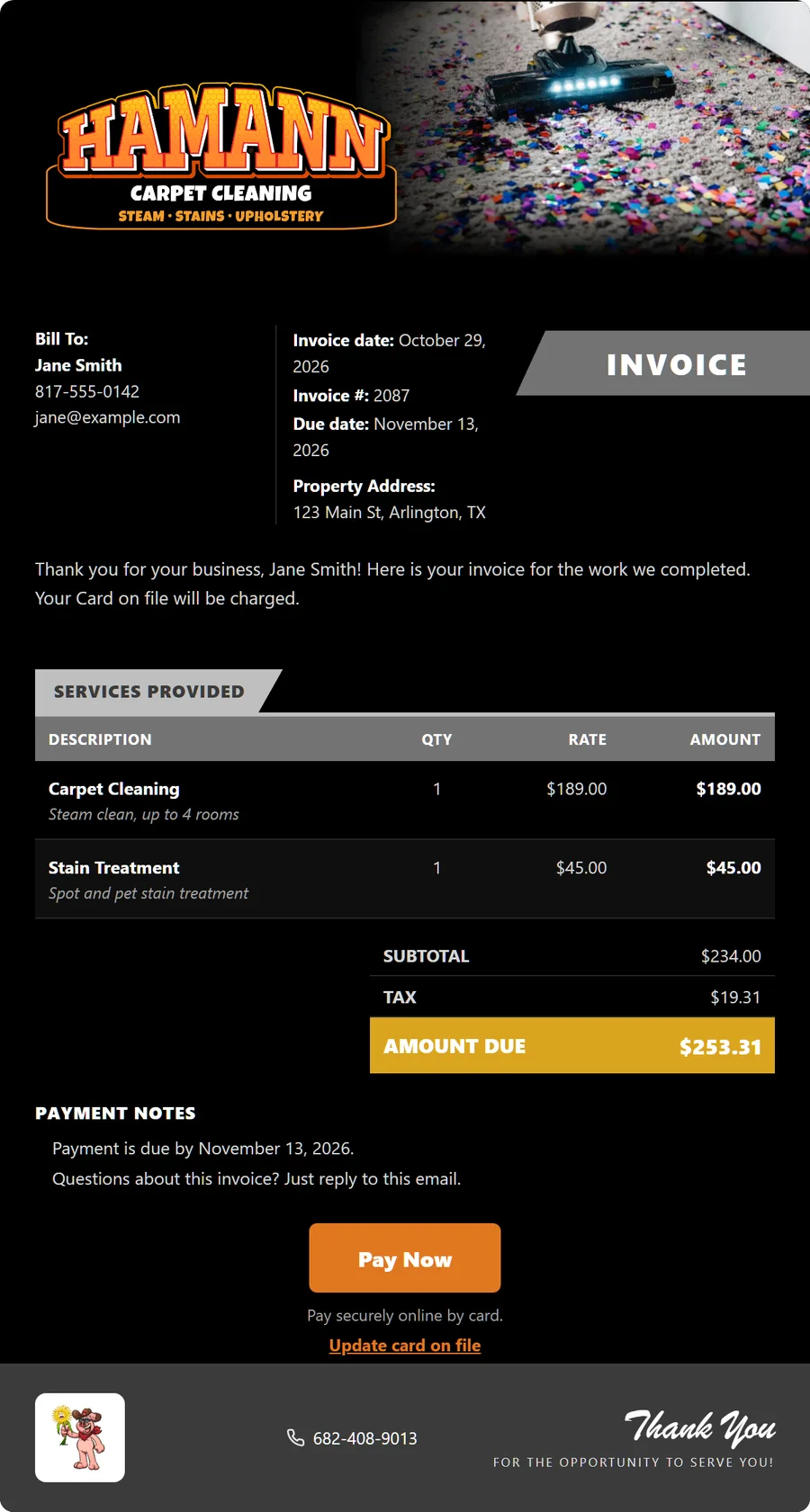
Build an estimate in minutes, email it from the platform, and let the customer approve it online with a single click. When a job is marked complete, the invoice is built — add-ons included — and the card on file is charged automatically, or roll a property manager's unit turnovers onto one monthly statement — all without leaving PaintingBossPro.

Fully customizable, top to bottom. Change every color, choose exactly what shows and what doesn't, and pick from over 100 preloaded header photos — or upload your own photos and logos.

  • Estimate builder with your service list and line items
  • Services priced off the property's square feet or number of rooms
  • Approved estimates become scheduled services
  • Invoices with line items and sales tax
  • Card-on-file auto-billing when the job is marked complete, or on a schedule
  • Email estimates with custom branded templates
  • Client-facing estimate page with Accept / Decline buttons
  • Invoice management with unpaid, partial, paid, and overdue filters
  • One monthly statement per property manager or business, each line labeled with the address
  • Past-due follow-up on unpaid invoices
  • Full payment history with method, date, and reference tracking
Branded Estimate
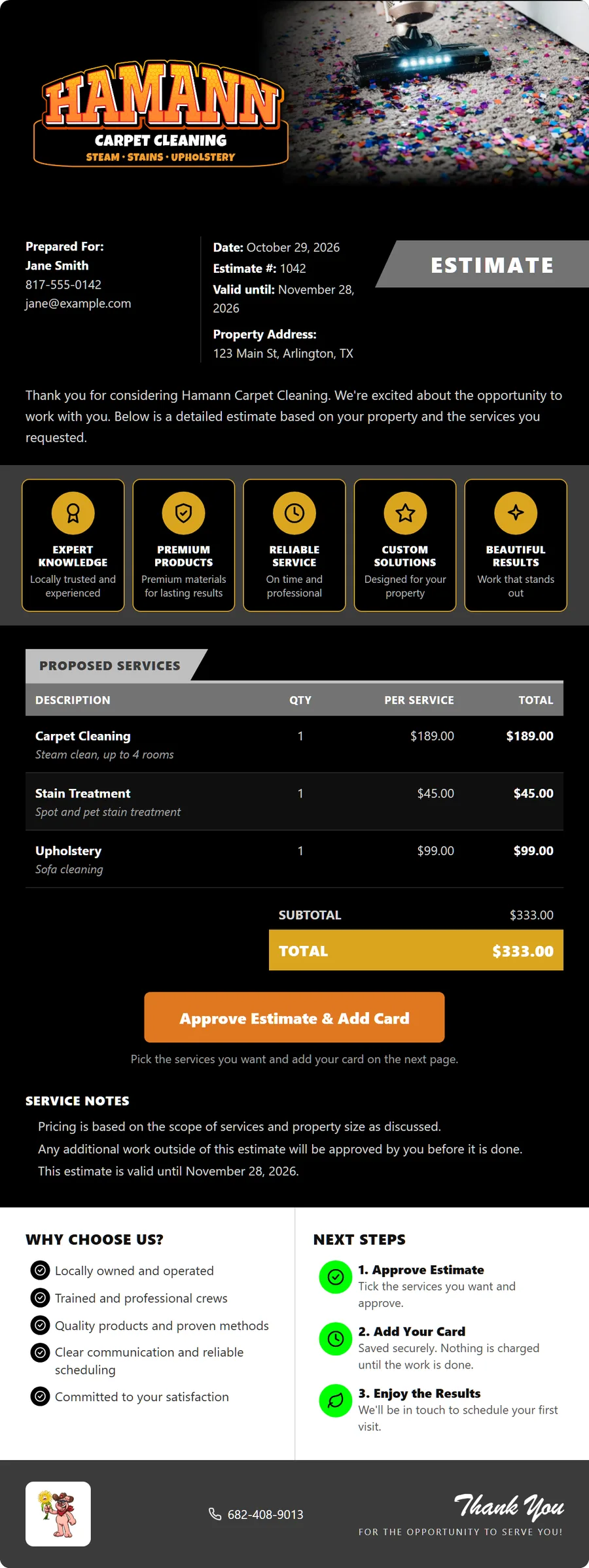
Branded estimate email with the company logo, a header photo, service badges and an Approve Estimate button
Branded Invoice
Branded invoice email with line items, sales tax, amount due and a Pay Now button
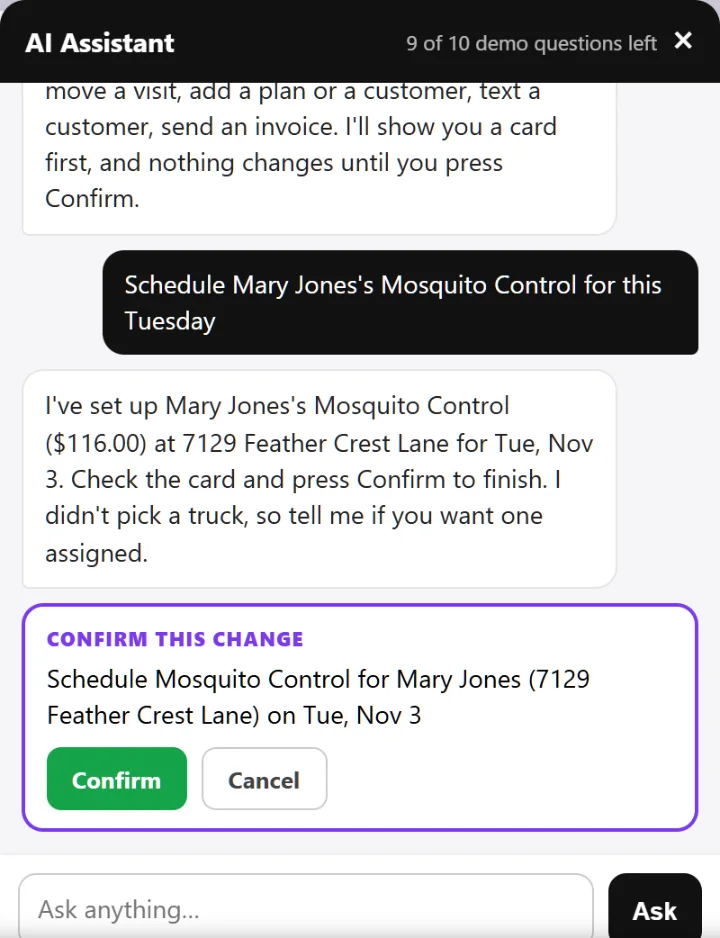
A Real Task, Start to Finish
AI Assistant scheduling a Mosquito Control visit for Tuesday, with a Confirm card
AI Assistant

Your AI Office Assistant. Just Tell It What To Do.

It's built right into PaintingBossPro and knows your customers, your schedule and your money. Type "Schedule Mary Jones's Interior Repaint for this Tuesday" and it finds the job, picks the date and shows you a card. Nothing changes until you press Confirm.

Talk to it like you'd talk to your office manager:

  • "Schedule the Smiths for Tuesday"→ Done
  • "Add a plan for Dirk at $50 a visit"→ Done
  • "Text Mary we're running late"→ Sent
  • "Take me to unpaid invoices"→ Opens the page
  • "How much sales tax did I collect last month?"→ Answered in seconds
  • "How do I set up auto-billing?"→ Explains it, with an Open button

It shows you every change first. Nothing happens until you press Confirm.

Included on every plan: 50, 100 or 250 questions a month. Need more? 250 more for $15.

Meetings

Book Meetings. Get a YES Back by Text.

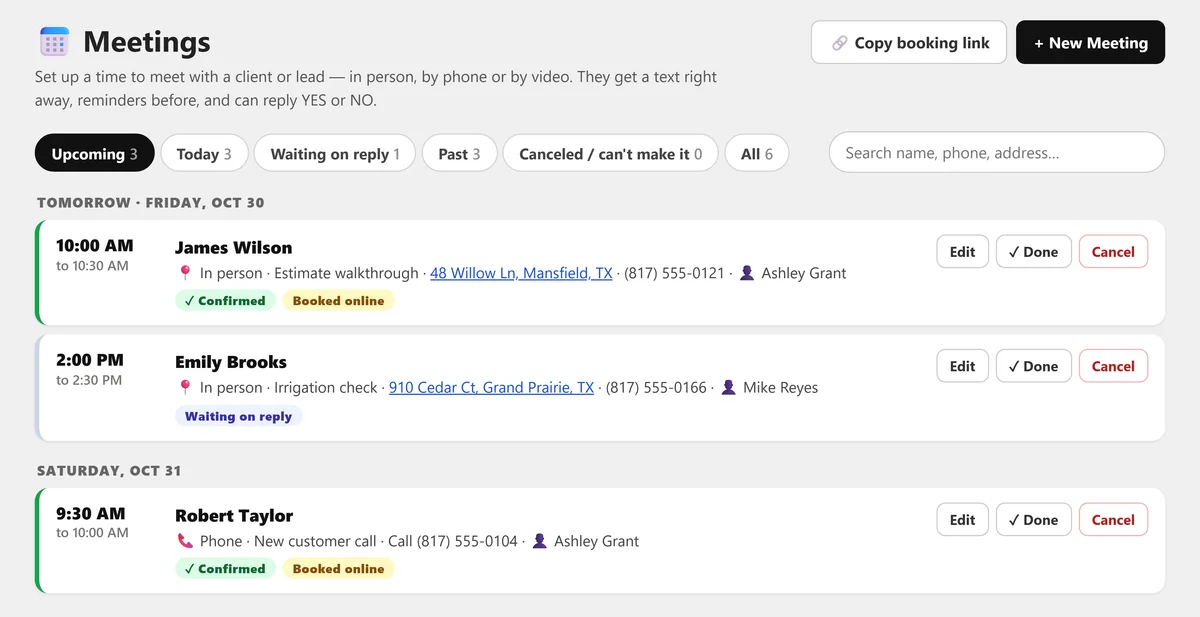
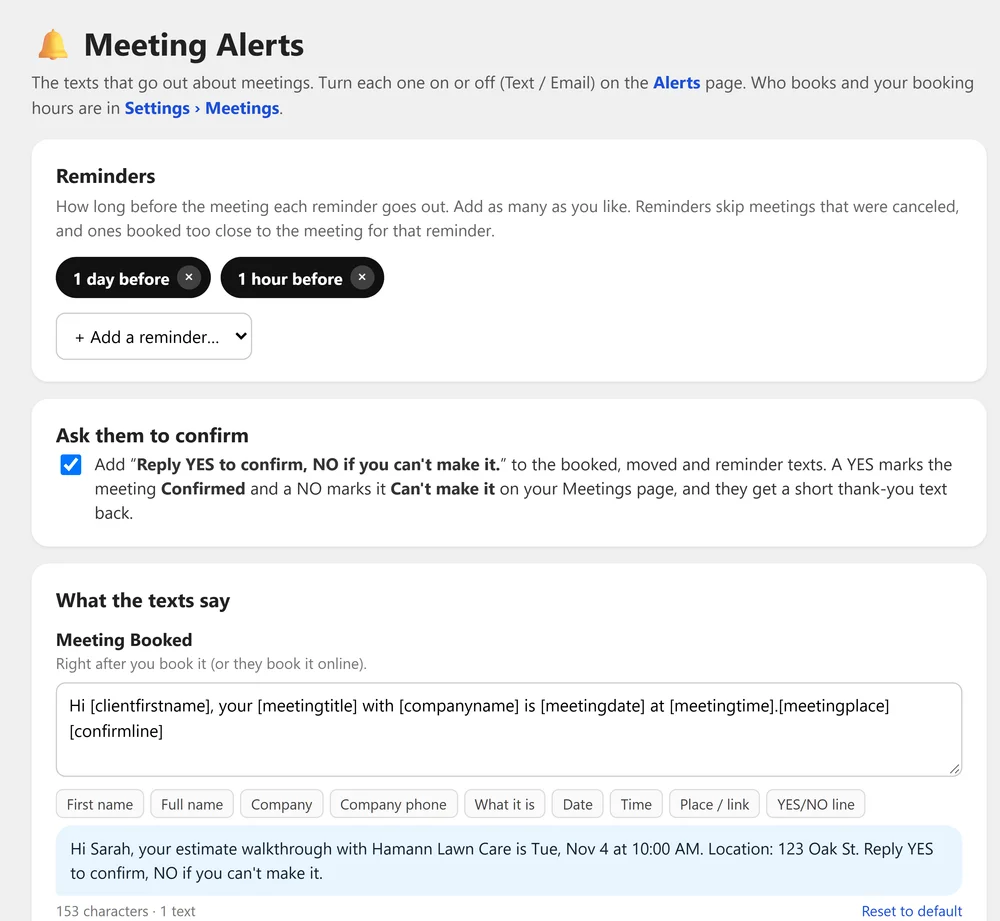
Estimate walkthroughs, phone calls or video meetings — your customers pick a day and time from your booking link, or you and your staff set it up for them. PaintingBossPro texts them right away and sends reminders before, and when they reply YES or NO the meeting marks itself Confirmed or Can't make it.

Your Meetings Page
Meetings page: upcoming meetings by day with Confirmed, Waiting on reply and Booked online tags, a Copy booking link button and New Meeting
The Texts They Get
Meeting Alerts: reminders 1 day and 1 hour before, a Reply YES to confirm option, and the booked text with a live preview
Turn Each One On or Off Under Alerts
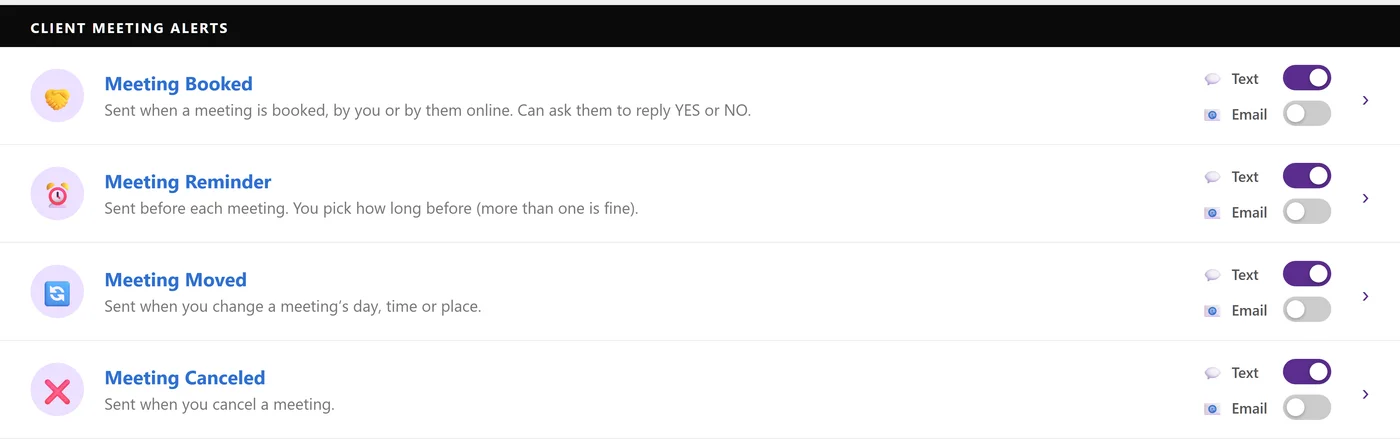
Alerts page, Client Meeting Alerts: Meeting Booked, Reminder, Moved and Canceled, each with its own Text and Email switch
Built for Residential & Commercial Painting Contractors

Every Estimate, Every Room & Every Paint Crew
On One Live Map

PaintingBossPro is estimating, scheduling, dispatch and billing software for residential and commercial painting contractors — interior rooms, whole-house repaints, exteriors, cabinets, trim and doors, accent walls, ceilings, drywall repair, deck and fence staining, and property managers on unit turnovers. Every job carries the areas, square feet, interior or exterior, number of coats, sheen, the surface, the brand and color codes and the prep list, approved estimates wait on a live map so you can book crews by area, every painter sees the job details and runs the painting checklist on their phone, the customer watches the crew on the way, and the card on file is charged when the job is complete.

Start Your 14-Day Free Trial
No credit card required  ·  14-day free trial  ·  from $59/mo after
$59
Plans Start Per Month
14
Day Free Trial
$0
Per-User Fees
24/7
Access Anywhere

Affordable Doesn't Mean Cheap.
This Is Enterprise-Level Software.

We priced it like operators because we are operators. We know what it's like to pay for software that nickel-and-dimes you and still doesn't fit how a service company actually runs. PaintingBossPro does what the big platforms do — a live dispatch map, automated texts, card payments, role-based access, a tech mobile app — set up for painting contractors and priced for a real company. Plans start at $59 a month, and you are never billed per user.

🗺️

Live Waiting List Map & Dispatch

Every approved estimate and every new request — a whole-house interior, three bedrooms and a hallway, an exterior repaint, a kitchen of cabinets, a unit turnover — pinned on a live map. Circle the jobs in one part of town or select them and assign them to a crew in one step, with route order and auto-routing — standard on every plan, so your crews work one side of town instead of crossing it for one accent wall.

🏢

Property Manager & Commercial Accounts

Property managers, apartment complexes and commercial buildings on unit turnovers and repaints get ONE monthly statement covering every unit, each line labeled with the address — the one bill they ask for, without you building it by hand.

💬

Automated Customer Texts

Night-before reminders (“your painters start tomorrow at 8 — please clear small items off the walls and shelves”), “on the way” texts, a two-way texting inbox, estimate follow-ups and payment follow-ups — all going out without you picking up the phone.

✅

Painting Checklist

Every painter runs the same steps on their phone — walk-through and colors confirmed, floors and furniture covered, patch, sand, caulk and prime, cut-in, each coat, trim and doors, cleanup, touch-ups and the final walk-through — and the office sees the finished checklist on the job, with the coats, gallons and color codes used.

👑

Role-Based Access Control

Owner, Manager, Office, Crew Lead, and Mobile roles. Your office staff see what they need. Your techs see only their jobs.

📱

Crew App for Every Painter

Your painters see their jobs in route order with the details on each card — Living Room, Hallway, Trim, 640 sq ft, 2 coats, Eggshell, Agreeable Gray SW 7029 — plus the prep list and access notes like the lockbox code, navigate with one tap, take before and after photos, and mark the job complete before they load the van.

Circle the Stops on the Map.
Assign Them to a Van in One Step.

Every approved estimate and every new request lands on the Waiting List and drops a pin on a live map — interior rooms, whole-house repaints, exteriors, cabinets and unit turnovers. Draw a circle around a part of town — a subdivision, an apartment complex, a ZIP code — or just select the jobs, and PaintingBossPro assigns them to a crew in one step.

When spring exterior season hits and the phone is ringing with repaints and touch-ups, you stop juggling sticky notes and see exactly which crew is already working that side of town. No scribbled addresses. No paint van sent across town for one accent wall. No wasted miles.

  • Total stop count inside the circle, broken down by service
  • Interior Rooms, Whole-House Repaints, Exteriors, Cabinets and Turnovers
  • Pins colored not due yet, due now, or overdue past a 7-day grace
  • Assign all circled stops to a van at once — they drop onto the dispatch board in route order
  • Painting details on every job — areas, square feet, coats, sheen, surface, colors, prep and access notes
  • Know which van should take it before you dispatch. Stop wasting fuel and drive time.
Waiting List Map — Circle Selection
9
Stops Selected
Van 2
Assign To
5
Interior
2
Exterior
Interior · 5  |  Exterior · 2  |  Cabinets · 1  |  Turnover · 1
Breakdown by Service
Drops to the dispatch board in route order

Give Every Customer Their Own App —
And You Decide What They See.

Most software this powerful stops at you and your techs. PaintingBossPro gives your customers their own branded app they install right on their phone — no app store, no password, just a secure text-link login.

✓See where they are on today’s route on a live map — “You’re stop 3 of 5” — no more “when are the painters coming?” calls
✓View and pay invoices right from their phone — card on file, one-tap Pay Now
✓Request service — another room, the trim, a deck stain or a touch-up — without calling the office
✓Update their card, approve an estimate, or refer a neighbor
✓Pick their alerts — the night before, when they’re next, and when the tech arrives
✓See their before/after photos, rate the visit and see every invoice they’ve paid

You choose exactly what each customer can see — flip any feature on or off with a single switch.

Powerful Doesn't Have to Mean Complicated.

The big enterprise platforms take weeks to learn, months to set up, and require a dedicated person just to manage them. PaintingBossPro is designed so any owner or dispatcher can be sending crews out on day one — without training, without a consultant, without an IT department.

01

Set Up in One Afternoon

Add your services and pricing (per room, by the square foot, whole-house interiors, exteriors, cabinets, trim and doors, ceilings, accent walls, drywall repair, deck and fence staining, unit turnovers), import your customer list from a CSV, add your crews and painters, set up your property manager accounts, and configure your text templates. No implementation fee. No onboarding consultant. No 6-hour kickoff call.

02

One Screen Does Everything

The dispatch board shows the homes that came due and the new requests waiting to be booked, your scheduled jobs by van, your live map, and your day summary all in one place. Your techs get their jobs on their phone. No more scribbled addresses, and no switching between six different apps to run your day.

03

Built for the Job Site, Not the Desk

The crew app is built for painters, not office managers. Big buttons, clear status, the address and the job — Living Room, Hallway, Trim, 640 sq ft, 2 coats, Eggshell, the color codes and the prep list — plus access notes right on the job, the painting checklist, and one tap to navigate, mark a job complete, or add a note and before/after photos.

04

Automation Runs Without You

Set your alert templates once — night before, on the way, arrived, completed, estimate follow-ups, payment follow-ups. After that, PaintingBossPro handles customer communication on every job, every day, without you having to think about it again.

Stop Juggling 5 Different Apps

PaintingBossPro replaces your route whiteboard, your billing software, your texting tool, and the estimate spreadsheet — all in one place.

📋

Painting Waiting List

Every approved estimate and every new request waits on one list and on a live map. Book the next open days by area and assign the jobs to a crew in one step instead of working from a spreadsheet and a wall calendar.

🗺️

Dispatch Board & Auto-Route

Jobs by day on a week strip, filtered by van. Drag stops into order or auto-route them Closest First or Furthest First from your shop, with stop and dollar totals for each service.

📅

Residential & Commercial Crews

Run one crew on interiors, another on exteriors and a third on commercial repaints after hours. Save the views you use every morning and print job sheets for the painters who want paper.

🎨

Painting Details on Every Job

The areas being painted, square feet, interior or exterior, number of coats, sheen, the surface, the brand and color codes and the prep list, plus access notes — pets, lockbox code, furniture to move, HOA color approval. Shown as “Living Room · Hallway · Trim · 640 sq ft · Interior · 2 coats · Eggshell” on the lists and the painter's phone.

💰

Estimates & Invoices

Send professional estimates for homeowners, builders and property managers built from your service list — per room, by the square foot, whole-house interiors, exteriors, cabinets, trim and doors, drywall repair, deck staining — let customers approve them online, and turn approved estimates straight into scheduled jobs. Track every dollar owed.

💳

Card-on-File Payments

Accept credit cards right through the platform. Store cards on file, charge automatically when the job is done, take online payments, and track payment history all in one place.

💬

Two-Way SMS

Send and receive text messages from customers right inside the app. Full conversation history organized by contact — no more switching to your phone.

🔔

Automated Alerts

Auto-text and email customers the night before the job, when the tech is on the way, has arrived, or has completed the job. Set it once and let PaintingBossPro handle the communication.

👥

Office & Property Manager Accounts

Manage homeowners, offices, apartment complexes and property managers with many addresses — an account set to Monthly gets one statement each month covering every address, with each line labeled.

🔑

Access & Job-Site Notes

Lockbox codes, the dog in the back yard, where to park the van and “HOA approved the colors — letter on file” — access notes on each job, right in front of the painter, and before/after photos when the job is done.

📍

Clients & Addresses

Clients with more than one address keep every address under one record. Tag them Property Manager, Commercial or VIP, add custom fields, and import your customer list from a CSV — imported addresses are placed on the map automatically.

🚐

Techs, Vans & Time Clock

Manage employees and vans, assign techs and vans to jobs, track hours on the time clock, and control who sees what with role-based access for office staff and techs.

📊

Dashboard & Reports

Custom stat cards show today's revenue, jobs completed, money owed, and more — all at a glance the moment you log in.

📞

AI Receptionist

A human-sounding AI answers your phone 24/7, knows your customers, books and reschedules, and takes new leads. 49¢ a minute, only when it answers.

⭐

Tech Reviews & Tips

After every job, customers rate the tech who did it and can leave a tip. Every tip is tracked per employee.

🎯

Crew Bonuses & Splits

Set bonus goals by gross, jobs or rating. Give drivers a bigger share. Techs see “You’re $200 away from your bonus” in the crew app.

💸

One-Click Payroll

Hours and overtime from the time clock, plus tips and bonuses, ready for Gusto, QuickBooks, ADP or Paychex. By hand or on a schedule.

👋

Meet Your Tech

Customers see who is coming before the visit, with a photo, star rating, reviews and an “about me.”

🔗

Zapier & Make

Connect PaintingBossPro to thousands of apps like Google Sheets, Mailchimp and Slack with instant webhooks and an API key.

📱

Social Inbox (Soon)

Facebook and Instagram messages, comments and lead forms plus Google reviews in one inbox, and post to all of them plus TikTok. Launching soon.

⚡

Fast Setup

Trucks, crew, products, services, pricing and packages in about 10 minutes. Upload what you already have.

🌐

Free Website

A 200–300 page website built for Google, with a free domain. Every form goes straight into PaintingBossPro as a new lead.

🎨

Make It Yours

Pick any colors for your software and choose exactly what shows in your sidebar, in any order.

📝

Estimates from the Field

Techs write and send estimates from the crew app on the spot, even with no signal.

🔒

Your Data Is Yours

Never sold, never shared. Export anytime. Bigger companies get a signed data protection agreement.
Built for Every Kind of Painting Job

Every job gets a service, the areas and square feet, the coats, sheen and colors, and its own place on the waiting list, so the board always says exactly what each crew is going out to do.

🖌️

Interior Painting

Priced per room or by the square foot — walls, ceilings, trim and doors — with the rooms, coats, sheen and color codes right under the address.

🏡

Exterior Painting

Siding, trim, doors and shutters on brick, stucco, fiber cement or wood, with the pressure wash, scraping, caulk and primer on the prep list before the first coat.

🚪

Cabinets, Trim & Doors

Kitchen and bath cabinet refinishing, trim packages and doors priced from your service list, with the sanding, primer and third coat checked off on the job.

🪵

Decks, Fences & Drywall

Deck and fence staining, drywall patches and accent walls booked on their own or added to a bigger job, so the crew knows what's on the ticket before pulling up.

🎨

Color Consultations & Touch-Ups

Color consultations, sample boards and warranty touch-ups on the same waiting list, with the color codes from the original job saved on the address for next time.

🏢

Property Managers & Commercial

Unit turnovers, common areas and commercial repaints at many addresses under one account, billed on one monthly statement with each line labeled by address.

We Got Tired of Getting Nickel-and-Dimed.
So We Fixed It.

Over the years we have tried just about every field service software out there. Every feature was an add-on. Every user cost more. Every upgrade was another invoice.

Want texting? That's an add-on. Want more users? Pay per user. Want the reporting module? Upgrade your plan. It never ended — and the people who built that software had never run a paint crew in their life.

That's why PaintingBossPro has three simple plans — Start at $59, Pro at $89 and Crew at $199 a month — and you are never billed per user. Every plan includes dispatch, the tech app, the customer app, estimates, invoicing and card payments.

The only metered piece is texting, because texts cost us money to send and receive. Start includes 500 texts a month, Pro 1,000 and Crew 2,000 — sent and received — and if you go over, it's $15 per additional 500. No gotchas. No surprises. We're operators just like you, and we built the pricing we always wished existed.

No contracts. Cancel anytime. No hidden fees — ever.

We give you everything you need to succeed, because we want you to win.

Software, a free website, AI answering, and a real owner who'll move your data and pick up the phone.

Your data is yours. Period.

Moving your business into new software is a big deal. Here is our promise, in writing.

We never sell your data
Not your info, not your customers’. Not ever, to anyone.
Your customers are yours
We never contact, market to, or sell to your customers.
Never used against you
We won’t use your data to compete with you or hand it to anyone in your industry.
Take it with you anytime
Export your customers, properties, invoices and history whenever you want.
Leave and it’s deleted
Cancel and we delete it within 90 days, or sooner if you ask.
Nobody snoops
We only open your account when you ask us for help. Your data never trains AI.

Larger company? We'll sign a Data Protection Agreement with you, already signed on our side. Request it · Privacy Policy · Terms

NEW

Tech reviews, tips & crew bonuses

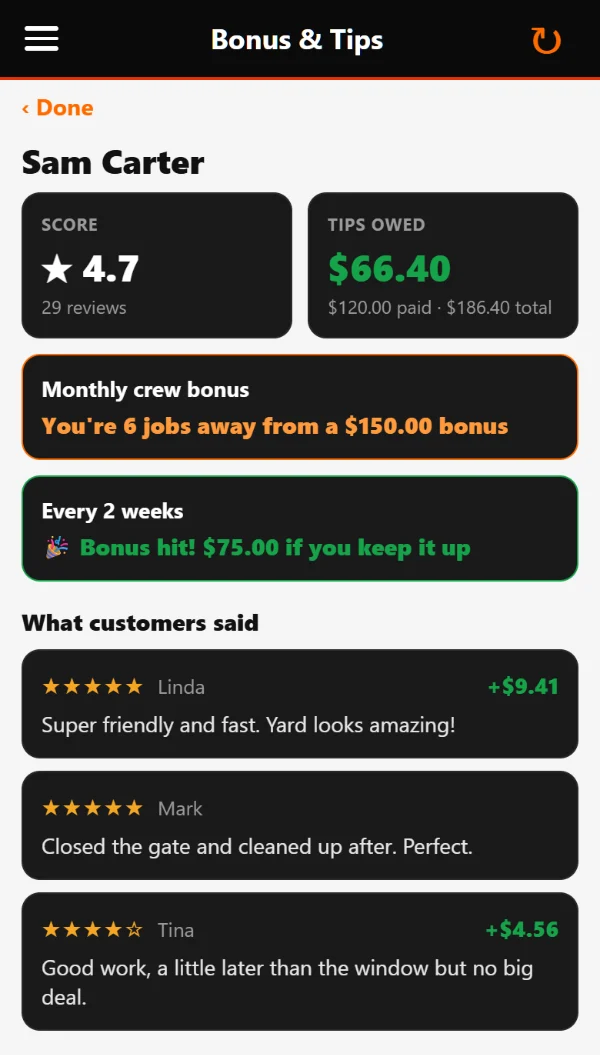
Your customers rate the tech who did the job and can leave a tip. Your crew sees their stars, their tips and exactly how close they are to their next bonus. Included on every PaintingBossPro plan.

Crew app Bonus & Tips screen: the tech's star rating, tips owed, how close they are to their bonus, and what customers said
What your tech sees in the crew app
Customers rate their tech
After every job, a text, email or app alert asks “How did Jake do?” One tap for stars and a comment.
Tips go to the crew
Customers tip on their card on file or a new card. Every tip is tracked per employee, minus processing.
Fair crew splits
Set the split per truck, give drivers a bigger share, or change any single job. Drag your crew between trucks.
Bonuses they can see
Set goals by gross, jobs or rating. Techs see “You’re $200 away from your bonus” in the crew app.
Meet your tech
Customers see who’s coming, with a photo, rating, reviews and an “about me” before the visit.
Run payroll in one click
Hours and overtime from the crew time clock, plus tips and bonuses, ready for Gusto, QuickBooks, ADP or Paychex. By hand or automatically.

Happy customers can share it on Google or Facebook too, and private feedback comes straight to you.

From “Can You Do Three Rooms and the Stairs Tomorrow?” to On the Route in Seconds

PaintingBossPro gives you a waiting list of every approved estimate and every new request, a dispatch board of the jobs by crew and by day, and a live map of every address, so every painter knows the areas, square feet, coats, sheen and colors before they pull up.

  • Waiting list with counts by service — interiors, exteriors, cabinets, decks and turnovers
  • Assign stops to a van in one step
  • Route order and auto-routing (Closest First or Furthest First from the shop)
  • Areas, square feet, coats, sheen, colors and prep under the address on every job
  • Pets, lockbox codes, where to park and what furniture to move on every job
  • Filter by van and day
  • Summary bar: total jobs, revenue, and jobs completed
  • Mark jobs complete, skipped, or rescheduled with one click
Today's Jobs — Van 1 (Residential)
1400 Oak Ridge Dr — Nguyen, T.
3 Rooms · Hallway · 620 sq ft · Berber / Loop · Low-Moisture
Done
27 Cedar Ln — Lopez, M.
Cabinet Painting · Kitchen · 3 coats · Semi-Gloss
Done
88 Willow Ct — Rental Home
Living Room · Bedroom · Hallway · Trim · 1,650 sq ft · 2 coats · Eggshell · lockbox 4417
In Progress
321 Maple Dr — Patel, S.
Exterior Siding · Exterior Trim · Fiber Cement · HOA colors approved
Up Next
4 Jobs · 1 VanDay Summary
2Jobs Done
2 invoiced
1In Progress
interior
1Exterior & Trim
1 up next

Communicate Like a Big Company.
Run Like a Small One.

Set up automated SMS and email alerts once. PaintingBossPro sends them automatically — so customers stop calling to ask “are the painters still coming today?”

📅
Night Before
“Your painters start tomorrow at 8 — please clear small items off the walls”
🚐
On the Way
Sent automatically from the tech's app when they head to the address
✅
Tech Arrived
Tells the customer the tech is at the house
🔄
Rescheduled Alert
Instantly notify on date changes
📄
Estimate Sent
SMS when the estimate hits their inbox
🔁
Estimate Follow-Ups
3 automated follow-ups if not accepted
🎉
Estimate Accepted
Celebrate (and get them on the route)
⭐
When They're Next
Tells the customer they're the next stop
💳
Payment Declined
Notify and follow up automatically
💬
Inbound Text Alert
Get notified when a customer texts you

Toggle SMS and Email independently for each alert type — you're in full control.

10+
Automated Alert Types
3
Estimate Follow-Up Sequences
3
Payment Follow-Up Sequences
∞
Custom SMS Templates

Office, Field, and Mobile — All Connected

PaintingBossPro isn't just for the office. Your painters get an app built for the job site — jobs in route order, one-tap navigation, the areas, coats, sheen and color codes on each card, the prep list and access notes, the painting checklist, before/after photos and one-tap complete. Roles control exactly what each person can see and do.

  • Role-based access: Owner, Manager, Office, Crew Lead, Mobile
  • Painters log in with a company login and personal PIN, see their jobs, the areas, square feet, coats and colors, access notes and past notes, run the painting checklist, take before/after photos, and mark jobs complete
  • Office staff manage requests, billing, and messaging
  • Employee time clock and hours reports
  • Automatic “on the way” and arrival texts straight from the tech app
  • Admin controls for adding, deactivating, and managing users
Team Access Levels
👑
Owner
Full access — all features, billing, users
🏢
Manager
Dispatch, customers, accounts, reports
📋
Office Staff
Billing, messaging, customer management
📱
Tech (Mobile)
Their jobs only — navigate, take photos, mark complete

Every Crew Paints It the Same Way. The Office Sees It Was Done.

The crew app walks every painter through the same painting checklist on every job — from confirming the colors with the customer to the last touch-up. The prep steps the office asked for, and one box per coat, show up on the job, and the finished checklist lands on the job for the office.

  • Walk-through and colors confirmed, floors and furniture covered, edges masked
  • Holes patched, sanded, caulked and primed — the prep steps the job calls for
  • Cut-in, first coat, second coat (and a third when the job calls for it)
  • Trim and doors painted, tape, plastic and drop cloths out
  • Touch-ups and the final walk-through with the customer
  • Coats applied, gallons used and the color codes on the walls
  • A condition — Good, Needs attention or Repair recommended — and a note for the customer
Finished Checklist — Van 2
6
Rooms Painted
12/12
Steps Done
1,650
Square Feet
Good
Condition
Whole-House Interior · 12 Pine St
Checklist done · $6,850 charged to card · 9 gal used
Billed
3 Rooms · Trim · 456 Elm Ave
Revere Pewter HC-172 · Eggshell · 2 coats
Next Stop
Exterior · 90 Birch Rd
Estimate approved online · on the waiting list for Monday
Approved

Built by an Operator. Owned by an Operator.

We're not a big corporation. We're not a venture-backed tech startup. We're a privately owned company built by someone who has been running a field-service business since 2006.

PaintingBossPro is part of the BossPro family of field-service software, built by an owner who has run trucks, routes and crews since 2006. We didn't have to guess what a company with vans on the road needs — the waiting list, the route for every van, the customer who wants a text before you pull in, the invoice that needs collecting. We lived it every day.

We built this software because too much of what's out there was built by people who have never run a service van, never had the phone ringing with the next service request while the van is still out on the route, never had to chase a payment while also dispatching the day. They build features they think you need. We build features we know you need.

PaintingBossPro is privately owned — no corporate board, no outside investors, no decisions made by people who have never run a route. When you call or message us, you're talking to the owner. That's the way we like it, and that's never going to change.

Fast. Reliable. No Delays.

PaintingBossPro runs on the latest and greatest infrastructure available today. That means your texts and emails go out in seconds — not hours. No queues backing up, no alerts firing late, no wondering if your customer got the message. Everything happens in real time, the way it's supposed to.

We built on a modern stack specifically to eliminate the performance issues and outages that plague older field service platforms. Less downtime. Fewer bugs. A faster experience every time you log in.

Alert Delivery
Tech On the Way SMS
Sent to customer · 0.4 seconds
Delivered
Estimate Email
Sent to customer · 0.9 seconds
Delivered
Night-Before Reminder SMS
Sent to customer · 0.6 seconds
Delivered
No Hours-Long Delays.
Your customers hear from you instantly — every time.

Everything a Painting Company Runs On

Painting Contractor Software
10 guides →
Estimates & Quotes
10 guides →
Scheduling & Crews
8 guides →
Crew App
8 guides →
Billing & Payments
7 guides →
Commercial & Property Managers
7 guides →
House Painting
7 guides →
Running a Painting Business
6 guides →

Have an Idea? We'll Build It.

Most software companies put your feature request in a queue and get back to you six months later — if ever. That's not us. When you have a suggestion or need something built for your workflow, we listen. We respond. And we build it fast.

Custom features for our clients typically ship in 1–2 weeks, not months. PaintingBossPro is built by someone who runs a field-service business, and we know that when you need something, you need it now — not on the next quarterly release cycle.

Our goal is simple: be the best software available for residential and commercial painting contractors. And the only way to get there is by building it with our clients — not just for them.

Feature Request Timeline
💬
You submit a request
Tell us what you need and why
Day 1
⚡
We start building
No committees. No approval queues.
Day 2–3
✅
Feature is live
In your account, ready to use
Week 1–2
Not months. Weeks.
Your input shapes the software you use every day.

Your Competition Is Already
Using Software Like This.

Stop running your painting company off a spreadsheet, a wall calendar and a group text. Get every approved estimate and new request on the map, book each crew in one step, send every painter to the right address with the rooms, coats, sheen, color codes and the lockbox code, charge the card on file when the job is done, send property managers one monthly bill, and give customers an answer to “when are you starting?”

Start Your 14-Day Free Trial
No credit card required  ·  14-day free trial  ·  from $59/mo after